Managed IT
How Much Do Managed IT Services Cost?
Three MSP quotes for one office can differ by thousands a month. Here is how a real managed IT number gets built and how to read a quote.
Picture three managed IT quotes on the same desk, priced for the same 22-person Hampton Roads office. One provider comes in near $2,200 a month. Another lands around $4,000. A third quotes north of $5,500. Same headcount, same laptops, same server closet in the back office. Whoever is staring at those three numbers isn’t necessarily being overcharged by any of them, and isn’t necessarily getting a bargain either. She’s looking at three different bets on how much risk and effort that environment actually carries, each one dressed up as a single monthly fee.
That gap is the part MSP sales pages never explain well. “It depends” is technically true and still useless on its own. This article walks through the pricing models providers actually use, the ranges you’ll see in the U.S. small-business market, a full build of a realistic Hampton Roads, Virginia quote from the ground up, and what we’d tell a friend to prioritize before signing anything.
The ranges below are for budgeting, not a Helix Stax rate card. We price after an assessment, because scope has to match the environment sitting in front of us, not a template. If you want a rough read on your IT health before pricing a contract, the free Helix Score takes about three minutes. When you’re ready to talk real numbers, book the free IT assessment and we’ll look at the environment first.
What does “managed IT” actually include?
Managed IT services typically bundle helpdesk support, device management, patching, email administration, network monitoring, backup checks, and vendor coordination into one monthly cost, with pricing built around scope rather than a fixed shopping list. Two providers can call the same fee “managed IT” and mean very different things.
Managed IT should cover the systems that keep your team working: helpdesk support, device management, patching, Microsoft 365 or Google Workspace administration, network monitoring, backup checks, security tools, and vendor coordination. For some companies it also includes servers, firewalls, cloud infrastructure, compliance reporting, procurement help, and after-hours coverage.
The issue is rarely the label. It’s the scope hiding behind it. One provider says “managed IT” and means password resets, antivirus, and remote support. Another means network management, backup testing, cloud administration, quarterly planning, and vendor oversight. Both can be telling the truth. They’re just selling different things wearing the same name, and the invoice won’t tell you which one you bought.
A useful managed IT agreement should tell you, without a follow-up call, who supports your people when something breaks, who watches the network and endpoints day to day, who patches systems and actually checks that backups restore rather than just run, and who owns Microsoft 365, identity, and MFA. It should also settle who talks to the internet provider, the copier company, and the phone vendor when they’re all pointing fingers at each other, and who turns a year of ticket history into a plan instead of letting the same three problems repeat quarter after quarter.
At Helix Stax, our Managed IT Services page lays out the full stack: help desk, monitoring, Microsoft 365, networking, servers, backup, disaster recovery, and endpoint management. We deliver some of that work directly and coordinate vetted partners when a client needs network operations coverage beyond our bench. The point is accountability. Someone has to own the outcome, not just the ticket.
What makes managed IT cost more or less?
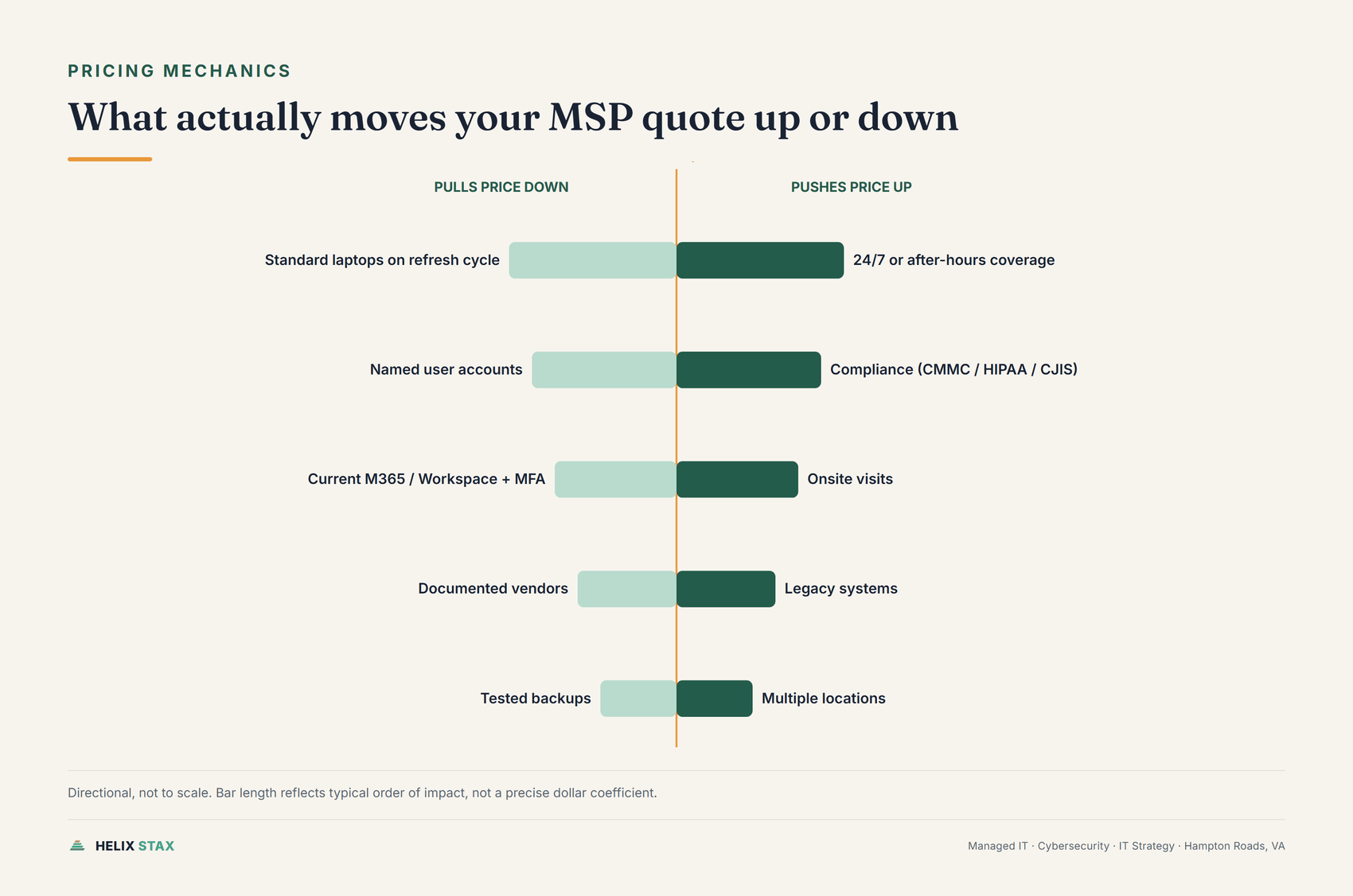
Coverage hours, compliance requirements, onsite visits, legacy systems, and multiple locations push managed IT pricing up, while standardized devices, tested backups, and current licensing with MFA already in place pull it back down. Providers price risk and effort, not headcount.
Before comparing a single quote, it helps to know what an MSP is really pricing. It isn’t your headcount. It’s risk and effort, and the two don’t always track each other.
Coverage hours are usually the biggest lever. Business-hours support is cheaper to staff than a rotation that answers at 2 a.m., so if your operation runs shifts or your billing system can’t go dark overnight, expect a real premium for that promise. Compliance work adds a second layer entirely: CMMC, HIPAA, or CJIS obligations mean policies, evidence, logging, and audit trails have to be documented, not just implemented quietly in the background, and that documentation is labor a general-purpose helpdesk contract was never priced to include. Onsite visits carry their own cost, because remote-only support is the cheapest thing an MSP sells, and every trip to Norfolk, Newport News, Virginia Beach, Chesapeake, Portsmouth, Hampton, or Suffolk adds travel time that has to be priced somewhere. Legacy systems push the number up too. Old servers, unsupported software, flat networks with no segmentation, and shared logins all raise the effort required to keep things running and secure. Technical debt doesn’t disappear when you sign a contract. It becomes someone else’s monthly problem, and they will charge for it. Multiple locations compound all of it at once, since each site adds its own network gear, its own quirks, and its own drive time.
The environment can also pull the number down, and this is the half owners rarely hear about because nobody’s selling it to them. Standard laptops on a normal refresh cycle, named user accounts instead of shared logins, current Microsoft 365 or Google Workspace licensing with MFA already turned on, documented vendors so nobody’s guessing who owns the firewall, and backups that are actually tested rather than just scheduled: none of that is exotic. It’s the difference between an environment a technician can reason about in twenty minutes and one where every ticket starts with an archaeology dig.
The four pricing models, and what each one really means
Most MSPs price managed IT one of four ways, and knowing which one you’re looking at changes what questions are worth asking.
What is per-user pricing for managed IT?
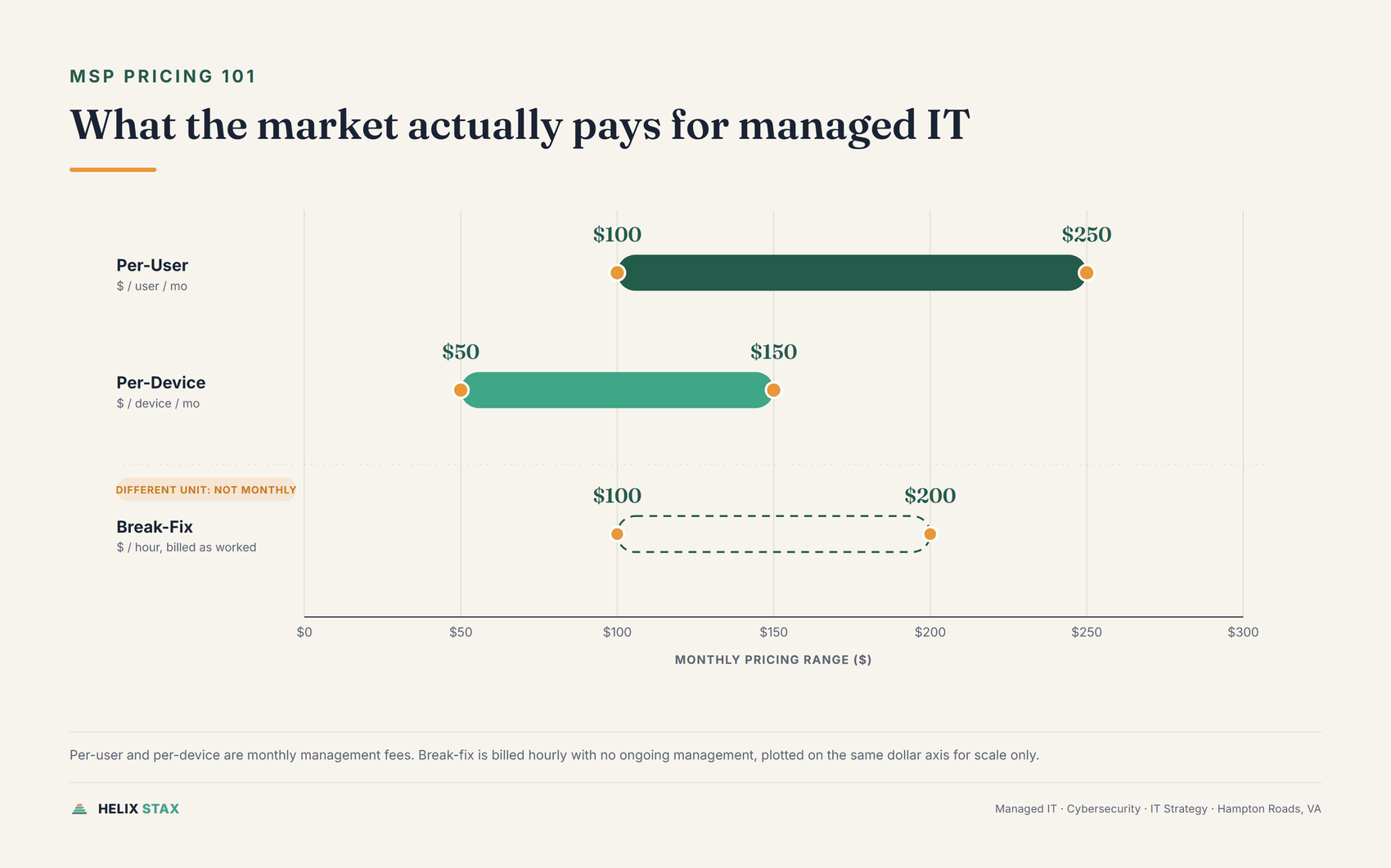
Per-user pricing charges a flat monthly fee per employee, usually $100 to $250 per user, covering whatever devices that person uses. It’s the simplest model to budget with because the cost tracks headcount, not equipment.
You pay a monthly fee for each employee or user, and that fee typically covers whatever devices they use. It’s the model most owners understand fastest, and in the U.S. SMB market a common range runs roughly $100 to $250 per user per month. Basic support sits below that band. Full support with security, backup oversight, Microsoft 365 administration, and planning runs toward the top. Per-user pricing also protects against cost creep when employees carry a laptop, a phone, and a shared workstation, because the fee doesn’t move with device count.
Per-device pricing
Here you pay by workstation, server, firewall, or network device instead of by person. This model makes sense when devices, not people, drive the support load, which is common in warehouses, clinics, and manufacturing floors where machines outlast the people using them.
| Device type | Monthly rate |
|---|---|
| Desktop or laptop | $50 to $150 per device |
| Mobile device (if included) | $10 to $25 per device |
Servers don’t fit neatly into a table like this one. We stopped quoting a flat per-server rate, because a number that made sense for one client’s setup was actively misleading for the next one. A single physical file server with tape backups and no after-hours coverage is a different job than a virtual server running production workloads with tested disaster recovery and a 24/7 monitoring contract. Three things move a server’s price more than anything else: whether it’s physical or virtual, what backup and recovery coverage is actually included (scheduled backups aren’t the same commitment as tested, restorable recovery), and whether it needs after-hours monitoring and response. Ask your provider to price the server you actually have, not a generic per-box rate.
A company with 15 employees and 15 workstations, no servers in the managed scope and no mobile device management, might pay 15 times $50, or $750 a month, under per-device pricing. That same company under per-user pricing at $150 per user would pay $2,250 a month. Per-device wins that comparison easily when device count sits at or below headcount. Add a server or two and the math changes, but not in a way a flat add-on rate can predict; get the server priced against its actual backup, recovery, and coverage requirements before you compare models.
Swap the scenario: a dental office with 10 staff and 25 workstations, multiple chairs, a front desk, a lab, shared equipment. Per-device pricing on 25 machines at $50 each comes to $1,250 a month. Per-user at $150 times 10 comes to $1,500 a month. Now it’s closer. If the device rate runs $60 instead, per-user might actually win.
It can also get strange fast: one employee running three devices costs more than a department sharing a single workstation, even when that department is objectively harder to support.
Which model wins: per-user or per-device?
Neither model wins universally. The right answer depends on your device-to-employee ratio.
Per-user pricing tends to win when each employee uses one or two devices (laptop plus phone is the standard), you run a knowledge-work business such as professional services, consulting, insurance, finance, or law, headcount is relatively stable with standard equipment, and you want the simplest possible billing.
Per-device pricing tends to win when you have significantly more devices than employees, equipment is shared across multiple people, you’re running a lab, production floor, or clinic environment with specialized hardware, or your MSP’s per-device rates sit well below what the per-user math produces.
The quick test: multiply your headcount by the per-user rate. Then count your managed devices and multiply by the per-device rate. Take the lower number. That’s the model that benefits you.
One thing to watch: per-device contracts sometimes exclude certain endpoints or charge extra for servers. Read the scope carefully. Per-device pricing with a server surcharge and a mobile management add-on can end up costing more than it looks like at the device rate alone.
Tiered pricing
Tiered plans bundle service levels into packages, usually named something like Basic, Standard, and Premium.
| Tier | Included | Per-user rate |
|---|---|---|
| Basic | Helpdesk, monitoring, patching | $100 per user/mo |
| Standard | Basic, plus EDR and backup management | $165 per user/mo |
| Premium | Standard, plus vCIO and security training | $225 per user/mo |
Tiered models work well when your team has mixed needs; you might put executives on the premium tier and field staff on the basic tier. They also create an upgrade path, which is exactly why MSPs like them: revenue grows without renegotiating the whole contract. Tiers are simple to buy and easy to compare on price alone, which is exactly the problem. The tier name tells you less than the exclusions do, so read what’s left out before you read what’s included.
Flat-rate pricing
One number, one monthly invoice, for an agreed scope. This works well when a provider has done a real assessment first and priced the scope they actually found on the network. It gets dangerous when the number is a guess, because a provider that under-scoped the work either eats the loss quietly or buries the limits somewhere in the contract you’ll discover later, usually at the worst possible time.
Break-fix, which isn’t really managed IT
Break-fix is repair work, not management. You call when something breaks, then pay by the hour, typically $100 to $200, with emergency or senior engineering time running above that. It can feel cheaper during quiet months. It also rewards delay, because nobody on that arrangement is paid to prevent the outage in the first place. Once a business crosses roughly eight to ten employees, the math on paying someone to prevent problems usually beats paying someone to fix them after the fact.
A real Hampton Roads quote, built line by line
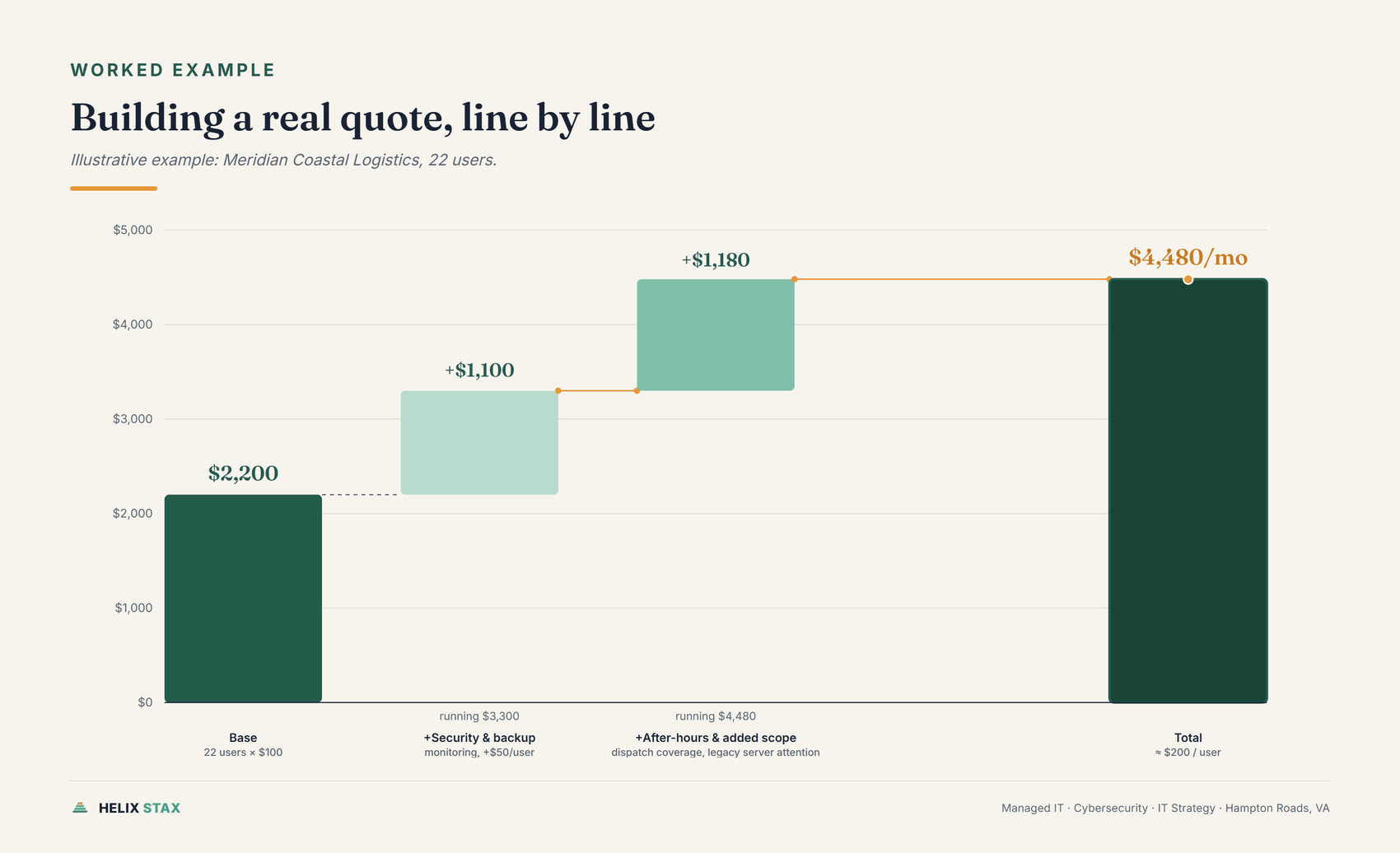
Numbers stay abstract until you watch one get assembled. So here’s a full build for an illustrative example: a 22-person logistics and dispatch operation in Chesapeake, call it Meridian Coastal Logistics. It isn’t a real client and the figures are constructed for illustration, but the math tracks the same ranges cited throughout this article.
Meridian runs a small dispatch floor with three shared workstations, a fleet of laptops for office staff, an aging on-premises file server nobody’s gotten around to migrating, and enough freight and customer data that “we should probably have real backups” has come up in three different meetings this year. Dispatch covers evenings, so somebody needs to be reachable after 6 p.m.
Start with the floor: 22 users at the base per-user rate of $100 per month covers helpdesk, patching, and Microsoft 365 administration. That’s $2,200 a month before anything else gets added. Layer in real security and backup monitoring, roughly $50 per user, and the number climbs to $3,300. Add after-hours coverage for the dispatch team, another $40 per user, and it reaches $4,180. Finally, that legacy file server needs closer monitoring and manual backup checks until it gets migrated, since it’s unsupported and running past its useful life. For this scenario, call that extra attention $300 a month, not a rate any provider publishes, but a reasonable estimate for what an unsupported, unmigrated box adds to a quote. The total lands around $4,480 a month.
That works out to roughly $200 per user, comfortably inside the $100-to-$250 range cited earlier and squarely in the middle of what a 15-to-30 person Hampton Roads business typically budgets. It’s also a useful way to see where the money actually goes: nearly half of Meridian’s premium over the bare-minimum quote comes from two decisions, after-hours coverage and an unmigrated server, not from the provider padding margins.
How much do Hampton Roads businesses pay for managed IT, by size?
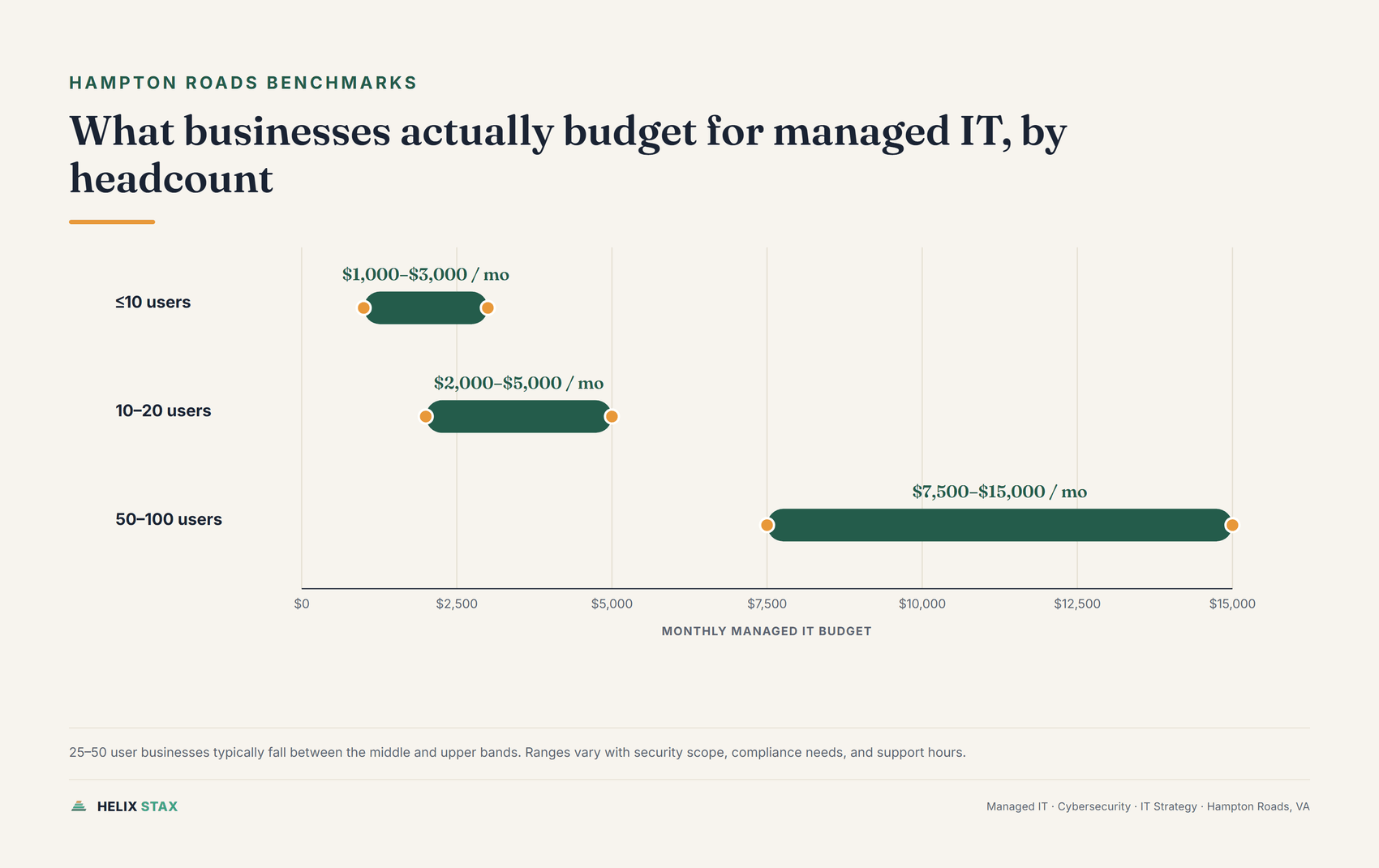
Very small offices under ten users typically pay $1,000 to $3,000 a month, 10-to-20-user businesses pay $2,000 to $5,000, and 50-to-100-user companies pay $7,500 to $15,000, with security, compliance, and coverage hours moving each range higher.
Zooming back out from one illustrative company, the pattern holds across small businesses in Virginia generally, not just the handful of cities this article keeps naming. Very small offices, roughly ten users or fewer, typically see monthly MSP pricing from $1,000 to $3,000. A 10-to-20-user business should expect $2,000 to $5,000 a month for managed IT that includes helpdesk, device management, Microsoft 365 administration, patching, and backup monitoring. Push into the 25-to-50-user range and the number climbs further, especially once security controls, backup reporting, and Microsoft 365 administration are all layered in, and it starts overlapping with what a 50-to-100-user company pays, which typically runs $7,500 to $15,000 a month.
Those bands stay broad on purpose. A 25-person law office, a 25-person medical practice, a 25-person defense subcontractor, and a 25-person field service company can share a headcount and nothing else about their risk profile. A quote that ignores that isn’t really a quote yet, it’s a placeholder.
If a number comes in far below what these ranges suggest, ask what’s missing before you celebrate the discount. Onsite support might be billed separately. Backup testing might not be included, only backup scheduling. Cybersecurity tools might sit outside the base fee. The helpdesk might be offshore and handle only the easy tickets. Or the provider might be planning to make its real money on hardware margins, software resale, or change orders once you’re locked into a contract term.
What does your total IT bill actually look like?
Everything above is the MSP fee. That’s one line on a bigger invoice most owners never add up in one place.
A realistic IT budget has three parts: the managed IT contract itself, priced per-user or per-device the way this article has covered so far, Microsoft 365 or Google Workspace licensing, and whatever cloud infrastructure the business runs on AWS or Azure. Most owners can quote the first number from memory. Few can quote the other two without checking, and fewer still have ever compared what they’re paying against what they’re actually using.
Start with licensing, since it’s the part with real published numbers behind it. As of this writing, Microsoft lists Microsoft 365 Business Basic at $7.00 per user per month paid annually, Business Standard with Copilot at $23.50 per user per month, and Business Premium with Copilot at $32.00 per user per month, per Microsoft’s published Microsoft 365 Business pricing page. Multiply that by headcount and it adds up faster than most people expect. Twenty employees on Business Premium runs over $600 a month before a single support ticket gets opened. The waste here is rarely the list price itself. It’s Premium seats assigned to people who only use email and Word, or licenses still active for employees who left the company months ago.
Cloud infrastructure is the harder number, and we’re not going to hand you one we can’t back up. AWS and Azure bills vary by workload, region, reserved-capacity commitments, and how disciplined a team has been about cleanup, so there’s no honest per-user or per-business range to quote the way we can for Microsoft 365. What we can tell you is where the waste tends to sit, because it’s the same handful of places on nearly every environment we’ve reviewed: compute instances sized for a load spike that happened once and never got scaled back down, storage volumes still attached to a bill months after the server they served was decommissioned, duplicate tools doing the same job because two hires each brought their own preferred stack, and reserved capacity nobody renewed or right-sized once the original project wrapped.
Finding that waste takes a cloud cost review, not a guess. It means checking actual usage against actual billing line items and asking, resource by resource, whether it’s still doing something the business needs. That’s a different exercise than shopping for a cheaper MSP, and it’s usually where more money is sitting.
The MSP fee is the number you negotiate. The licensing and cloud bill are the numbers you audit. A managed IT conversation that only covers the first one is leaving the bigger opportunity on the table. Book the free IT assessment and we’ll talk through all three, not just the contract line you already know the number for.
What we’d actually recommend
Here’s our honest read, not a sales pitch dressed as advice: most businesses overspend on the wrong lever and underspend on the one that actually reduces risk.
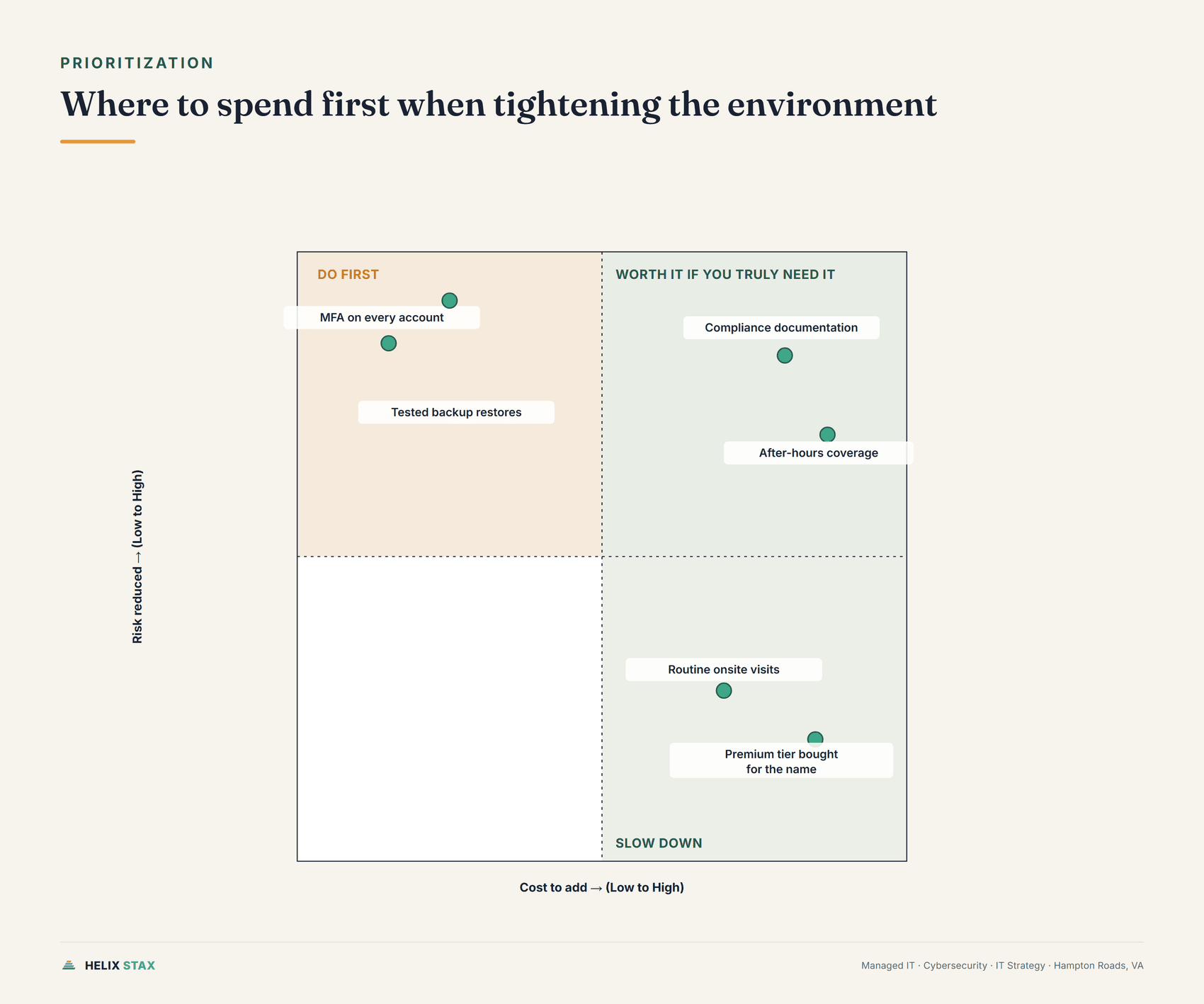
If we’re prioritizing a limited budget, identity and backup come first, always. MFA on every account and backups that get test-restored quarterly cost relatively little to add and close the two gaps that cause the worst days in this business: a compromised login and a backup that turns out not to work when you need it. Compliance documentation and after-hours coverage come next, but only if the business genuinely needs them. A CMMC-adjacent defense subcontractor doesn’t get to skip compliance work. A nine-to-five professional services office with no shift coverage almost certainly doesn’t need to pay for a 24/7 rotation it will never call.
Where we’d tell someone to slow down: buying a premium tier because it sounds thorough, without confirming what’s actually excluded, and paying for onsite visits out of habit when most tickets resolve remotely anyway. Both of those are common ways businesses end up paying enterprise prices for small-business needs.
On model selection specifically, per-user pricing is the right default for office teams where headcount and device count move together. Per-device pricing earns its keep in warehouses, clinics, and anywhere shared equipment outnumbers staff. Flat-rate pricing is worth considering only after a real assessment has scoped the environment, never as the opening offer. And break-fix should be treated as a stopgap for the smallest teams, not a long-term strategy once the business has more than a handful of employees depending on the systems staying up.
What should you ask before signing a managed IT quote?
Before comparing monthly numbers, ask each provider what’s included, what’s excluded, whether backup restores are actually tested, who owns Microsoft 365 security, and what happens after hours. The answers matter more than the price on the cover page.
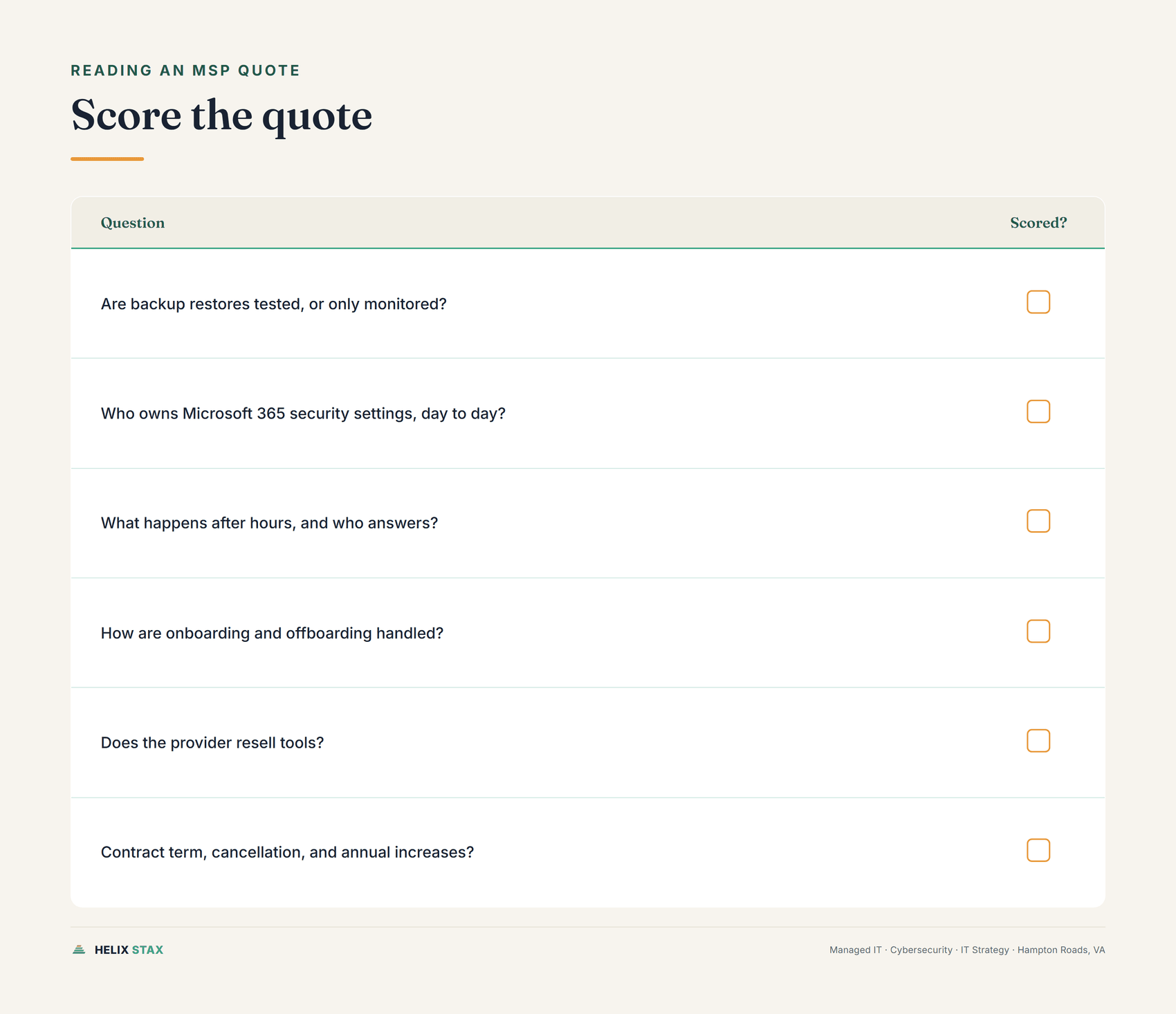
Do not start by comparing the monthly number. Start by comparing the work. Ask each provider to define what’s included, what’s excluded, and what costs extra, then push on the specifics that tend to hide inside vague MSP language: whether backup restores are actually tested or only monitored, who owns Microsoft 365 security settings day to day, what happens after hours and who picks up, how onboarding and offboarding get handled when someone joins or leaves, whether the provider resells tools in a way that shapes what they recommend, and what the contract term, cancellation terms, and any built-in annual increases look like.
Then ask how they plan, not just how they respond. A managed IT provider worth keeping should be able to show you the difference between tickets, risks, and projects. Tickets are daily support. Risks are what could hurt the business if left alone. Projects are planned work that improves the environment before it becomes a risk. Treat all three the same and you’ll live in the ticket queue forever, paying a monthly fee to stay exactly where you started.
This is also where IT Strategy & vCIO work earns its keep. Managed IT keeps the systems running today. Strategy decides what should change next, what should wait, and what should never get bought in the first place. For a lot of Hampton Roads businesses, the right move isn’t a cheaper MSP. It’s a cleaner operating model that makes the MSP relationship smaller and more predictable.
A Norfolk, VA business with a downtown office, remote staff, and cloud apps needs a different support plan than a multi-site operator running warehouses on both sides of the water, and travel time, onsite frequency, and network age all show up in the final number before anyone even mentions compliance. Managed IT services cost should track the cost of downtime, risk, and wasted staff time, not get priced like a spare office expense. If your business loses real money when email, Wi-Fi, dispatch, billing, phones, or shared files go down, that math belongs in the budget conversation from the start, not as an afterthought once something breaks.
You don’t need the biggest package on the price sheet. You need a scope that matches the business you actually run. Start with an inventory: count users, devices, servers, locations, key apps, vendors, and any regulated data, then write down your top five recurring IT problems and the systems that would stop revenue if they failed for a day. That’s enough context for any serious provider to talk to you honestly instead of pitching you a tier.
That’s also the difference between hiring a vendor and hiring Helix Stax. We’re a full-stack IT consulting firm based in Hampton Roads, so the same conversation that prices your managed IT quote also covers security, compliance, and the vCIO planning that decides what the quote should include in the first place. One team, one number, no separate bill six months later for the strategy work nobody scoped up front.
If you want that done with a local team, start with the free Helix Score for a three-minute orientation. When you’re ready to go deeper, book the free IT assessment. We explain what we find in plain English, and if a managed IT agreement makes sense, we’ll tell you what should be in the quote before anyone talks about a contract.
Read more

Managed IT
Managed Services for Small Business: What You Actually Get
What managed IT services include for a small business, what they leave out, and how to judge a provider. A plain-English guide for Hampton Roads firms.

Managed IT
Windows 10 Extended Security Updates: What Keeping It Costs
Windows 10 is out of support. See what Extended Security Updates cost per PC, what stops working safely, and how to choose between ESU, upgrading and replacing.
Managed IT
What Is an MSP? Managed Service Provider, Explained
MSP stands for managed service provider. Here's what that means in plain terms, what an MSP actually does, what it costs, and how it differs from an IT consulting firm.
Frequently asked questions about Helix Stax managed IT services
Managed IT services commonly cost $100 to $250 per user per month, or $50 to $150 per device per month, depending on scope. A 15-person business may budget $1,500 to $3,750 monthly on a per-user model. Security, compliance, after-hours support, and legacy systems increase cost.
Small businesses often see managed IT budgets between $1,000 and $5,000 per month, depending on users, devices, support hours, and security needs. A 10-user company at $150 per user would pay $1,500 monthly. Regulated industries or 24/7 coverage can move the number higher.
Managed IT can be priced per user, per device, flat rate, or as a hybrid. Per-user pricing is common for office teams because it follows headcount and covers each employee's devices. Per-device pricing can fit clinics, shops, and production environments where shared machines outnumber staff.
Managed IT often costs less than hiring one full-time IT generalist, especially after benefits, tools, training, and management overhead. A provider also brings multiple skill sets instead of one employee. The tradeoff is that contract scope matters, so compare included services before treating the monthly fee as equivalent.
A standard managed IT contract may include helpdesk, monitoring, patching, endpoint protection, backup checks, Microsoft 365 administration, vendor coordination, and reporting. Higher tiers may add vCIO planning, compliance support, security operations, and onsite visits.
Managed IT is usually worth the cost when downtime, security risk, or staff interruptions carry real business impact. The value comes from prevention, faster support, patching, backup oversight, and predictable budgeting. Very small teams with minimal systems may still use break-fix support until risk or complexity grows.
A flat-rate managed IT plan sets one monthly fee for the agreed support scope. It can simplify budgeting because routine tickets and maintenance are not billed per incident. Read exclusions carefully, because projects, hardware failures, after-hours support, onsite work, or unusual applications may still be billed separately.
Look for defined services, response targets, escalation steps, exclusions, contract term, cancellation language, price adjustment terms, data ownership, security responsibilities, and reporting cadence. Avoid vague promises such as unlimited support without clear scope. The contract should make billing and accountability understandable before a problem occurs.